If you have useful know-how and only a few weeks, 7 PDF products you can create and sell this month gives you a practical goal: turn one helpful idea into a paid download. You do not need a large team or a complicated business plan to begin. You do need enough time to make the file clear, useful, and ready for a buyer.
A print-ready PDF is a fixed-layout file prepared to print at its intended page size without changing its fonts or spacing. You can work from your skills and what a specific audience needs, then make a listing for a finished product. Publishing this month is achievable; sales are not guaranteed.
The route is straightforward: choose a focused problem, shape an offer around a useful result, make and inspect the file, then publish it. Your available time and experience help determine which idea is realistic. A useful offer matters more than a promise of income.
This article gives you seven practical directions and a simple way to judge whether one suits your skills before you invest weeks in production. Look for an idea you can explain clearly and finish to a standard you would trust as a buyer.
Key Takeaways
- Choose one specific audience and recurring problem.
- Test interest before building a large product.
- Make the download easy to understand and use.
- Show buyers exactly what the product includes.
- A listing can go live this month, but sales are never certain.
What Makes a PDF Product Worth Buying?
People pay for a useful outcome, not for a PDF file by itself. A digital product earns consideration when it solves one recurring problem, saves time, teaches a concrete skill, or helps someone organize a task.
A focused product should tell buyers who it is for and what they can do with it. A broad topic such as budgeting or meal planning often needs a narrower audience and result. For example, “plan meals” is less specific than “organize five budget-friendly dinners and a grocery list for a busy week.”
That distinction matters because buyers need to recognize their own need in the offer. A niche audience may be first-time budgeters, new parents, or students preparing for a particular exam. The narrower promise gives people a clearer reason to consider the product and helps you decide what belongs in the file.
Digital downloads do not require packaging, warehousing, or shipping. That can simplify the business side of selling, but it does not guarantee demand or profit. You still need a product people want, a clear description, and a sales channel where the intended audience can find it.
Before you make pages, ask what a buyer will be able to finish, understand, or organize after using the download. If the answer is vague, tighten the outcome. The seven formats below can deliver concrete results in different ways.
7 PDF Products You Can Create and Sell This Month
Several kinds of narrowly focused PDF downloads can be completed this month. The best choice depends on the audience you understand and the task you can help them complete.
A digital product does not need hundreds of pages to be useful. A small set of well-made pages can do a job better than a large file filled with extras. Treat each idea as a specific product, not a general topic, and build only what the buyer needs to get the promised result.
Daily planners and habit trackers
A daily planner can serve students, busy parents, freelancers, or people who want a calmer way to organize a day. Include a time-blocked schedule, a short priority list, notes, and habit prompts such as “Did I take a walk?” or “Did I prepare tomorrow’s lunch?” A simple tracker could cover a week or a month.
Keep the page easy to reuse. Buyers may print another copy or write on a tablet, so provide enough room for handwriting and avoid prompts that assume everyone follows the same routine. A planner with clear labels and useful blank space is easier to return to than one that dictates every hour.
Short problem-solving guides
A focused guide can help a reader complete one task, such as meal prep on a budget, organizing a home office, or preparing for a first client meeting. Give the reader a sequence of actions, examples, and a finish line. A focused ebook can be outlined in 8-10 short chapters when the subject needs that much structure.
Original examples make the advice specific and easier to apply. A first version may take a weekend to a week to create, depending on research and revision. That is a rough production reference, not a promise of sales or a reason to stretch a simple subject into an ebook.
Budget and expense worksheets
A printable or fillable spending and savings worksheet can help first-time budgeters see what comes in, what goes out, and what they want to set aside. Useful fields might include pay dates, recurring bills, flexible spending, a savings goal, and a space for notes about one adjustment to try next month.
The worksheet should make sense without a seller standing beside the buyer. Label each field in plain language and include a brief example of how to complete it. Stay within your experience: a tracking sheet is not a promise of financial results or a substitute for personal financial advice.
Editable Canva templates
Independent creators and small organizations may want ready-made layouts for social posts, event flyers, or simple business updates. Pair Canva layouts with clear instructions and an editable link, then state what the buyer can change and what the product is designed to help them create.
Licensing needs to be clear. Explain whether the buyer receives a PDF, an editable Canva link, or both, and what use the license allows. Check the terms for any included fonts, images, and design elements before making the templates available.
Educational worksheets and chore charts
Parents, tutors, and teachers may use age-appropriate learning activities or household chore charts. A worksheet could offer vocabulary practice, number puzzles, or reading questions. A chore chart could assign clear tasks and include a place to mark completion without requiring a complicated reward system.
Match the content to the intended age or learning level. Instructions that suit a confident reader may not work for a younger child. State the intended level clearly, and make sure examples and page layout support the activity rather than distract from it.
Niche recipe and meal-prep planners
A focused weekly menu can help a particular audience plan dinners, such as students cooking for one or families looking for lower-cost meals. Include a weekly menu, grocery list, and recipe pages with serving amounts and clear steps. A small, coherent set is easier to use than a scattered collection of unrelated dishes.
Do not overstate nutrition expertise. Describe the practical focus of the menu, such as quick preparation or a limited ingredient list, without claiming it treats a health condition or meets every reader’s dietary needs. Invite buyers to adapt recipes to their own requirements.
Resume and cover-letter kits
New graduates and career changers may value an editable resume and cover-letter set with practical usage guidance. Include sections for work history, education, skills, and relevant projects, along with prompts that help the user replace sample text with accurate details.
Make the document easy to edit and explain how to adapt it for different roles. Avoid claims that the kit will secure interviews or hiring outcomes. The useful promise is a clearer way to organize an application, not control over an employer’s decision.
These ideas differ in the knowledge and time they require. Choose a format that matches what you can explain well and produce with care; the strongest fit is the one you can make genuinely useful.
How to Match an Idea to Your Skills and Audience
If a friend keeps asking how you track monthly spending, you may already have the start of a product idea. Your experience can point to a useful PDF, but it only matters when a specific audience needs the same help.
Match a skill you can demonstrate to a problem people regularly face. The table gives examples of how experience can lead to a clear offer. Treat each connection as a starting point, not proof that buyers will want the finished product.
| Skill or experience | Likely buyer | Recurring problem | PDF angle |
|---|---|---|---|
| Teaching experience | Parents or students | Extra practice or prep | Worksheets |
| Personal budgeting experience | First-time budgeters | Tracking spending | Monthly worksheet |
| Design experience | Independent creators | Faster branded content | Editable template kit |
| Job-search experience | New graduates | Organizing applications | Resume and job-tracker kit |
Look for a task you can explain with real steps and examples. If your work history gives you experience helping students prepare for tests, you may know which practice questions cause confusion. If you have organized your own job search, you may know how an application tracker keeps deadlines visible.
Stay within your competence, especially when a product touches nutrition, finance, or career outcomes. You can share a personal planning method without presenting yourself as a licensed expert or promising a specific result. Be clear about what your file does and does not provide.
A plausible audience fit is only a working hypothesis until you test interest. Write down the buyer, the recurring problem, and the outcome you propose. Then look for a concrete sign that people want help with that task before spending too much time making pages.
How to Test Demand Before You Build
You can test demand with a small public signal before the full PDF exists. Describe the problem and proposed result, then invite people to take a specific next step.

A sign-up or paid order is stronger evidence than a like. A simple 48-hour test can start with a post about the idea on day one and a presale or waitlist on day two. Keep the promise clear enough that people know what they would receive.
| Test | Action | Signal to watch | What to do next |
|---|---|---|---|
| Audience post | Describe the problem and proposed result | Specific replies or questions | Refine the offer |
| Presale or waitlist | Present a clear outline and invite sign-ups | Actual sign-ups or paid orders | Build the promised version |
| Marketplace check | Review related listings and buyer language | Clicks, saves, or sales where visible | Narrow the angle |
For example, a meal-planning idea might be framed around helping students plan five low-cost dinners and one grocery trip. Ask whether that result would help, what makes the task difficult, and what a buyer would expect to find inside the download.
Likes can show that people noticed a post, but they do not show that someone intends to use or buy the product. Specific replies, waitlist sign-ups, and paid orders offer more useful signals. Marketplace clicks, saves, and sales can also help you see which product language draws attention when those measures are visible.
If the test is quiet, revise the idea instead of building more pages. The audience may need a different result, or the offer may not be specific enough. When the idea earns enough interest to justify the work, begin creating the file.
How to Create a Clear, Useful PDF
If people often ask how you prep meals on a budget, turn your answer into a step-by-step guide rather than a long collection of general tips. Start with the reader’s task and keep the file focused on helping them complete it.
Build the content around one outcome, then inspect the exported PDF. The reader should be able to follow the material without guessing what to do next. A tidy design cannot make missing instructions useful.
Draft around one outcome
Write down the starting problem, the actions the user needs to take, and the result they should reach. For a meal-prep guide, the sequence might begin with setting a food budget, then choosing meals, making a grocery list, and preparing ingredients.
Use examples and instructions instead of filler. Show a sample grocery list or explain how to adjust a plan when an ingredient is unavailable. If a step depends on a choice, say what to consider. Readers should not have to infer the method from a decorative page.
Keep each page connected to the promised result. A brief introduction can explain who the product is for and how to use it. Remove repeated advice and unrelated background that makes the reader work harder to find the useful steps.
Lay out, export, and inspect the file
Google Docs or Canva can help you assemble the content and export it as a PDF. Choose a page format that suits the intended use, such as a standard letter-size page for a printable worksheet or a screen-friendly guide that readers can scroll.
A short guide can use 8-10 concise chapters when the subject needs that structure. That is an organizing option, not a requirement. A one-page checklist may serve its purpose better without chapters, while a longer process may need sections that follow the reader’s steps.
Export the file, then open that version and inspect it instead of assuming the design preview is error-free. Check that headings, page order, examples, and any links survived the export. The content and export are now ready for the usability checks that make the file comfortable to use.
How to Make a PDF Easy to Use and Print
A buyer who prints a worksheet and finds the writing areas too small cannot use the page as intended. A print-ready PDF is a fixed-layout file prepared to print at its intended page size without changing its fonts or spacing.
Check the exported file both on paper and on a screen. A template should make its task clear at the size buyers will use. These five checks catch common problems before someone has to contact you for help.
- Read body text at normal size and check that text contrasts clearly with its background.
- Check margins and page breaks so content does not crowd an edge or split awkwardly.
- Open the exported PDF and test links rather than trusting the design file.
- Offer a printer-friendly version when color is not essential to understanding the page.
- View the file on a phone or computer to check that it remains readable on screen.
Plan for how the buyer will use the page. A printable worksheet needs enough room to write, while an interactive or fillable file needs every field tested. A fillable box that looks right in a preview may not accept text as expected in the exported version.
Ask someone who has not seen the file to open it and try one task. If they cannot find the right page or understand a prompt, revise the wording or layout. Once the product works on paper or screen, decide what buyers receive and how to price the offer.
How to Price and Package a PDF Download
A single-page tool serves a smaller task than a coordinated bundle of pages that guides someone through a whole process. Price the offer in relation to its scope and usefulness, not simply its page count.
Use reference prices as context, not as a promise of what your product will earn. Simple planners commonly sell around $5-$20, while larger planner bundles can reach $25-$75. Ebook sale amounts vary widely, with a cited range of $5-$100 per sale.
| Offer type | Reference price range | How to use the reference |
|---|---|---|
| Simple planner | $5-$20 | Compare scope and usefulness |
| Larger planner bundle | $25-$75 | Make extra pages or tools clear |
| Ebook | $5-$100 per sale | Treat the broad range as context, not a promised price |
There is no single source-backed price for every worksheet, resume kit, or template. Compare the scope, specificity, and work saved for the buyer. A focused file that helps someone finish a task may offer more value than a longer download that leaves the next steps unclear.
A bundle is useful when its parts work together. For example, a planning guide paired with a matching worksheet can help a buyer move from instructions to action. Extra pages that repeat the same information add size, not value, so explain each part’s purpose in the offer.
Consider what the buyer receives: a PDF, an editable source file, or a set of coordinated resources. Spell out the file types and contents so no one expects an editable document when they are buying a fixed-layout download. With the offer clear, choose a sales channel that suits its audience.
Where Can You Sell a PDF Product?
The best sales channel depends on whether built-in marketplace discovery or more control matters most. A marketplace can place a listing among related products, while a storefront or your own website gives you more control over how the offer appears.

Choose a channel that fits the product and your ability to bring buyers to it. The marketplace or storefront should let customers understand what they are buying and access the files after purchase.
Marketplace listings for discovery
Etsy is suited to printables and planners, where shoppers often browse for specific downloads. Gumroad supports varied downloadable offers, so it can fit products beyond printable pages. A marketplace may offer built-in discovery, but a listing still needs a clear title and accurate details.
Related listings can help you understand how sellers describe their products and what previews they show. Do not copy another seller’s text or designs. Pay attention to the way buyers talk about a task, then describe your own product in plain language that matches its contents.
A storefront for direct sales
Payhip provides a customizable storefront for digital products. A seller’s own website offers more branding control, but the seller must bring traffic to it. Pick the level of control you can maintain without turning the listing setup into a project that delays a usable offer.
A Payhip digital products list can cover distinct downloadable files or bundles. Keep the names and descriptions specific so a buyer can tell the difference between each offer. For example, separate a printable worksheet from an editable template kit rather than presenting both as an undefined “planning pack.”
Digital products to buy are easier for customers to assess when a listing shows exactly what is included. Use sample pages, state the file type, and explain whether the product is printable, fillable, or editable. Once the listing fits the offer, focus on bringing relevant buyers to it.
How to Promote Your PDF Without a Large Audience
A short post showing one step for tracking weekly spending can demonstrate the value of a budget worksheet without a large audience. Give people a useful piece of the process, then make it easy to find the full product.
Share practical content that connects directly to the buyer’s task. Pick one route you can maintain, then use it to point interested people to a clear listing rather than making broad claims about income.
- Instagram or TikTok: demonstrate one useful tip in a short post, such as how to sort expenses into fixed and flexible costs.
- Pinterest: create a visual that shows the product’s use and link it to a relevant listing.
- Email: send a useful excerpt to your email audience and include a clear product link.
- Blog post: answer a related question and point readers to the full download for the complete process.
Each route works best when the content matches the offer. A post about meal planning should not send people to an unrelated resume template. Show one real example or useful step, and explain how the product helps someone continue.
Paid ads are an option to consider only after you have evidence that the offer and listing can convert. Paying to send more people to a confusing product page can increase costs without answering whether buyers want the product. Regular, useful content is a steadier starting point than vague claims about quick income.
Keep the first effort manageable. Choose one promotion route, note what people ask or click, and use those observations to improve the listing. A simple pace helps you keep sharing without letting promotion take over the time needed to support the product.
What Can You Do in the First Month?
You can use a month to validate, create, and publish a first version of a digital product. A clear plan turns the available time into decisions and deliverables instead of leaving you with an unfinished idea.
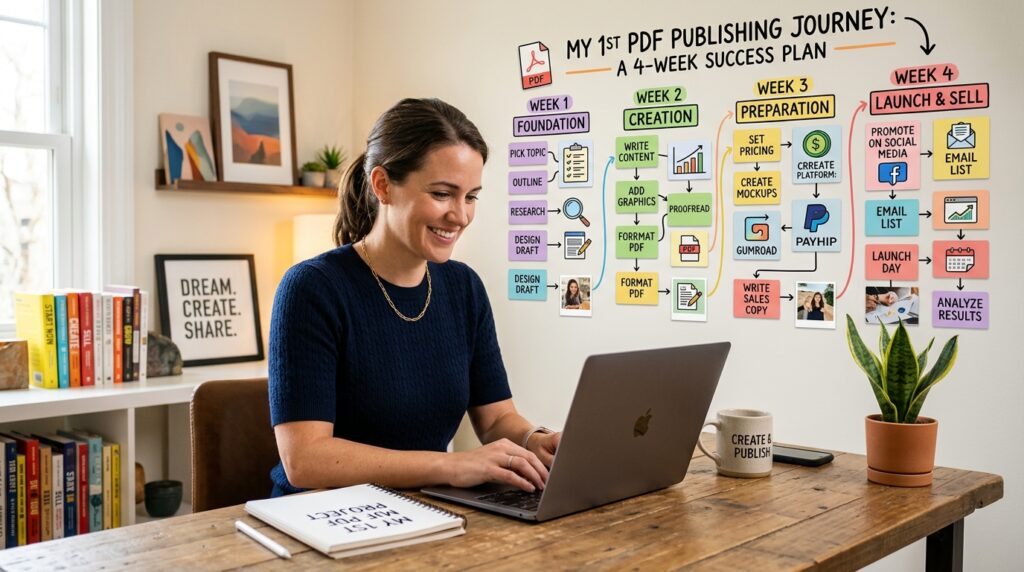
This is a suggested pace, not a promise that a product will sell in four weeks. Adjust the sequence if your subject needs research or your schedule is limited. The aim is to finish a usable offer and learn from the response.
| Week | Main task | Deliverable | Decision point |
|---|---|---|---|
| Week 1 | Choose a narrow audience and test interest | Clear offer and early signal | Proceed or refine |
| Week 2 | Draft and design | First usable PDF | Fix missing instructions |
| Week 3 | Set price and publish listing | Live product page | Inspect the buyer’s view |
| Week 4 | Share useful content and review responses | Initial feedback and listing observations | Improve or keep testing |
In week one, write a one-sentence offer and show it to likely buyers. Their questions can point to missing details about the result or the product’s intended user. Use that response to decide whether to proceed or adjust the focus before creating the file.
In week two, draft the content and make a complete first version. Focus on a usable product rather than polishing every design detail. If a reader needs an instruction that is not there, add it before the file goes live.
In week three, set a price, publish the listing, and inspect the page from a buyer’s point of view. In week four, share useful content and review responses. The next step is to improve or keep testing, while watching for common listing and buyer-experience mistakes.
What Mistakes Can Hurt PDF Sales?
A buyer who opens a download and sees several files without knowing which one to use may lose confidence immediately. Clear presentation helps people understand what they bought and how to begin.
A polished cover cannot make an unclear or incomplete product useful. Check the offer from the customer’s point of view and fix the places where they may hesitate or get stuck.
- A vague title: replace “Life Planner” with a specific outcome, such as “Weekly Planner for Student Assignments.”
- Preview images that hide what is included: show clear sample pages and identify the files buyers receive.
- No instructions for editable files: add a short setup note that explains how to open and edit them.
- Untested links or missing files: check the customer download path and open each delivered file.
Specific words make the product easier to judge. If a title does not name the intended user or task, a buyer may not know whether the file fits. A few honest sample pages can answer questions that a decorative cover cannot.
Editable files need a little more care than a standard PDF because buyers may need to open a link, make a copy, or use a specific tool. Brief instructions can prevent confusion. Test the path yourself as though you had just paid and received the download.
When the basic presentation is reliable, you can consider what to create or bundle next. Start with a related need that follows naturally from the first product rather than adding unrelated files just to make the offer look bigger.
Can One PDF Lead to More Digital Product Sales?
A buyer who finishes a guide may need its matching worksheet to put the advice into practice. A useful first PDF can point toward related digital products, as long as the next offer helps the same customer complete a real task.
No format is automatically among the most profitable digital products. Demand, buyer fit, and creation effort differ, so a larger product line does not guarantee more income or sales.
- Bundle related worksheets with a guide when they support the same process.
- Create a companion version for a clearly different audience with a distinct need.
- Add an optional editable source file when it genuinely helps buyers use the product.
For example, a guide that helps new graduates organize a job search could lead to a companion application tracker. The second product should add a practical step, not simply repeat the guide in another format. Clear links between products help customers see why an extra offer may suit them.
Recurring access only makes sense when you can provide ongoing updates or support. A subscription label does not make a static file more useful. Before offering extras, make sure you can maintain them and explain what customers will receive over time.
These digital product ideas should grow from buyer needs and your ability to serve them. If you plan to add material made by someone else, check reuse and licensing rights before placing it in an offer.
What Should You Check Before Reselling or Reusing Files?
A free download is not automatically free to sell. Free digital products to resell still need an explicit license allowing resale or commercial use.
Check the license for the file and each asset it contains. A download page or a low-cost purchase does not by itself show that you can resell, edit, or pass the material to customers.
- Confirm that resale or commercial use is allowed.
- Check rights for fonts, images, and other included assets.
- Read any attribution or redistribution conditions.
- Confirm whether edits or sublicensing are allowed.
These terms can differ from one file or asset to another. A template may allow you to use it for your own business but not resell it as a template. An image may be cleared for one kind of use and restricted for another.
When the terms are unclear, create original material or use assets with conditions you understand. Keep the relevant license details with your project files so you can make informed choices when building a new bundle or editable extra.
This is practical caution, not legal advice. Read the applicable license and do not assume a file is cleared because it was easy to download. Once the rights are clear, plan for the support buyers may need after purchase.
How to Improve a PDF After Launch
If several buyers ask the same question about a worksheet, the instructions may need a clearer example. Buyer questions can show where the product is harder to use than you expected.
Use repeated questions to look for a product gap, and low traffic to investigate reach first. Little traffic does not prove that the product itself is unwanted because few potential buyers may have seen the listing.
Separate a listing problem from a product problem. Attention without orders may point to unclear positioning or price, while buyers asking about the same instruction may reveal a missing step in the PDF. The signals suggest different changes.
Review buyer questions, support requests, and listing engagement. Look for patterns rather than changing the product after every comment. A single question may reflect one person’s situation, while repeated questions about the same page are a reason to revise its directions.
Change one meaningful element at a time so you can interpret the result. You might first clarify the listing’s intended audience, then observe whether people understand the offer more readily. If a specific instruction is confusing, revise that page and see whether the same questions continue.
Customer feedback is most useful when you connect it to a decision. Keep a simple record of the question, where it appeared, and what you changed. Once the file is clearer, make sure delivery and support are dependable as well.
How to Handle Delivery and Customer Questions
A buyer who pays but cannot tell which file contains the printable pages needs clearer delivery instructions. A dependable post-purchase experience starts with names and directions that make sense outside your own workspace.
Tell customers what they receive, where to find it, and how to ask for help. These four basics make it easier for a buyer to use the product without guessing.
- Name delivered files clearly, such as “Weekly Planner Printable” or “Read Me First.”
- Explain where to download the files and what tool opens each file type.
- Tell buyers how to get help, including the contact route you actually monitor.
- Explain how version updates will be communicated when updates apply.
Simple names help customers distinguish a fixed-layout PDF from an editable source file. If a product includes both, say which file to print and which one to edit. A short setup note can answer the first question before a buyer needs to send it.
Customer questions can reveal unclear instructions, but set realistic support boundaries. State what help you can provide and when you usually respond, if you include that information. Do not promise personal support you cannot provide or ongoing updates you cannot maintain.
One small, well-explained offer is a practical place to begin. Write down the task it helps someone complete, then share that one-sentence offer with the audience it is meant to serve.
Conclusion
The best first offer is narrow enough to finish and test. A specific buyer problem and a useful finished file matter more than a large page count.
A listing can go live this month, but sales are not guaranteed. Treat the first version as a chance to learn whether people understand the offer and find the download useful.
Choose one idea you can explain with confidence. Avoid adding pages just to make the product appear substantial; include the directions and tools a buyer needs to reach the promised result.
Your immediate next step is to write a one-sentence offer that names the audience, problem, and result. Share it with a small group of likely buyers and ask whether that result would be useful to them.